There’s something oddly satisfying about setting up your own internet. No waiting around for a technician. No awkward small talk while someone drills into your wall. Just you, a box of equipment, and the quiet hope that it all works on the first try.
Spectrum’s self-install option leans into that feeling. It promises a quick, no-fuss setup you can handle on your own time. Sounds simple enough—but the reality has a few more layers.
Let’s get into what actually happens when you go the self-install route, what can trip you up, and whether it’s the smart move for your situation.
The Appeal of Doing It Yourself
The biggest draw is obvious: convenience.
You pick up the kit or have it shipped. You plug things in. You’re online. Ideally, the whole thing takes under 30 minutes. No scheduling windows. No “we’ll be there between 1 and 5 p.m.” nonsense.
For a lot of people, that alone makes it worth it.
There’s also the small but real satisfaction of handling it yourself. It’s like assembling furniture and not having leftover screws at the end. You feel competent. Capable. Slightly smug, even.
And let’s be honest—most homes today are already wired for cable. If someone had Spectrum before you, or even another provider using the same infrastructure, there’s a good chance the heavy lifting is already done.
But that’s the best-case scenario.
What Comes in the Box
When you open a Spectrum self-install kit, it’s not overwhelming. That’s a good sign.
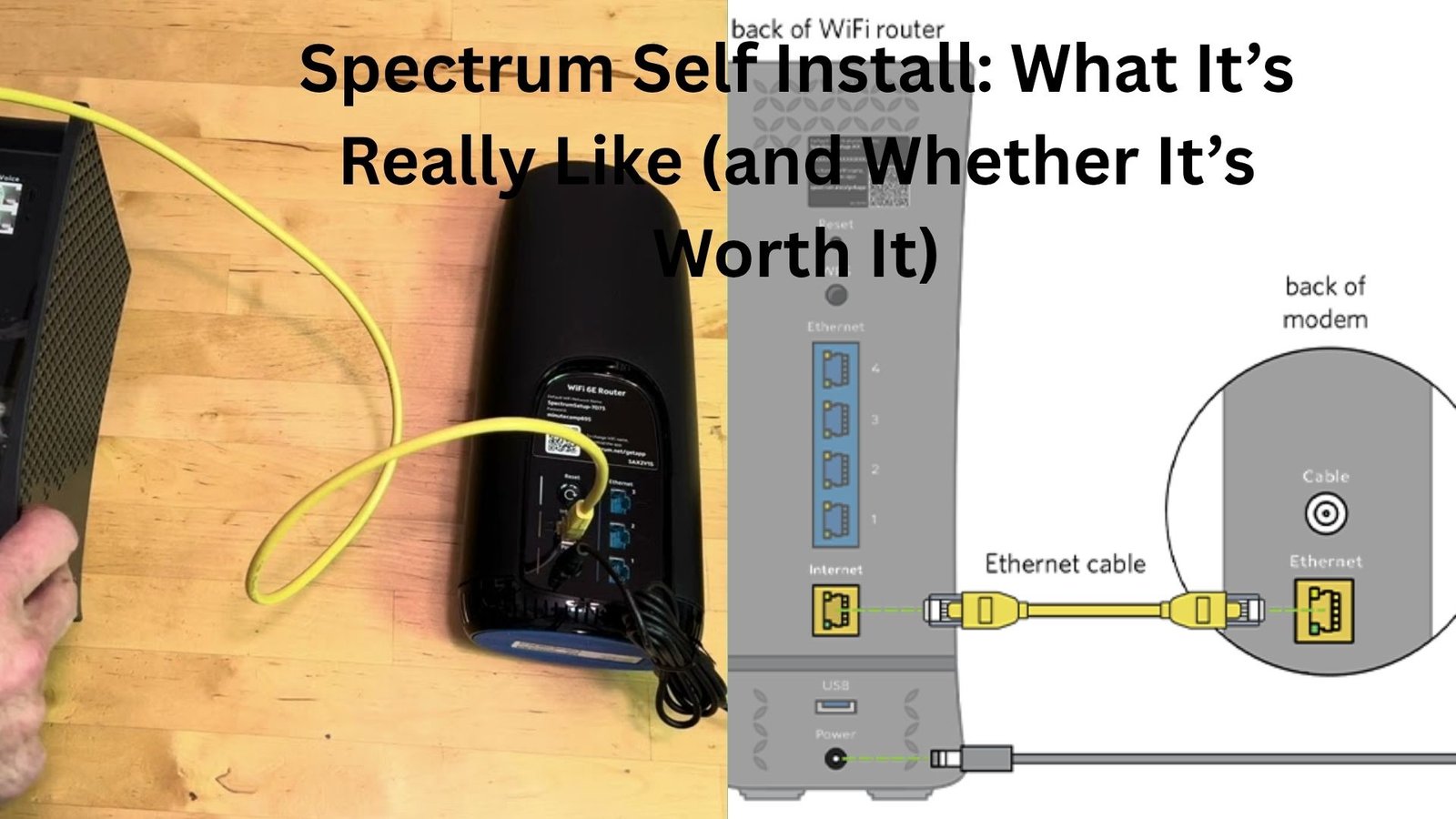
You’ll usually find a modem, sometimes a router (depending on your plan), a coaxial cable, an Ethernet cable, and a power adapter. There might be a quick-start guide tucked in there, but most people barely glance at it.
Everything is labeled in a way that makes sense. “Cable in.” “Ethernet.” Nothing cryptic.
Still, this is where people sometimes overthink things.
A common moment: you’re staring at the back of the modem, holding a cable, wondering, “Can I mess this up?” The answer is—mostly, no. The ports are different shapes and sizes. If it fits, you’re probably doing it right.
The Actual Setup Process
Here’s where things get real.
You connect the coax cable from the wall to the modem. Then plug in the power. Wait for the lights to stabilize. That part can take a few minutes, and it always feels longer than it actually is.
Then you connect the modem to your router (if it’s separate) using the Ethernet cable. Power up the router. Wait again.
Now comes activation.
Spectrum usually asks you to activate your service online or through their app. This step is straightforward—enter your account details, follow the prompts, and you’re in.
Most of the time, it works smoothly. You see a confirmation screen, your Wi-Fi network appears, and you’re browsing within minutes.
But every now and then, something stalls.
When It Doesn’t Go Smoothly
Let’s be honest—this is the part people don’t talk about enough.
Sometimes the modem lights just keep blinking. Or the activation page loops endlessly. Or your Wi-Fi shows up, but there’s no internet.
This usually comes down to one of three things.
First, the line isn’t actually active. Maybe the previous tenant disconnected service, or the line needs to be reconnected outside. In that case, no amount of plugging and unplugging will fix it.
Second, there’s a signal issue. Old cables, loose connections, or splitters hidden behind furniture can interfere with the signal.
Third, it’s just a backend hiccup. Spectrum’s system hasn’t fully registered your device yet.
Here’s a real-world scenario: someone moves into an apartment, plugs everything in, and nothing works. After an hour of frustration, they call support—only to find out the wall jack they used isn’t even connected. There’s another one across the room that works perfectly.
It’s not always obvious.
A Quick Reality Check on Time
Spectrum markets self-install as fast, and it can be.
But don’t plan your entire day around a 15-minute setup.
Give yourself an hour. Maybe two, if you want to be safe.
Not because it’s complicated, but because small delays add up. Waiting for lights to stabilize. Rebooting devices. Double-checking connections. Maybe even resetting everything once just to be sure.
If it works quickly, great—you’ve bought yourself extra time. If not, you’re not stressed.
The Equipment Question
Here’s something worth thinking about: are you using Spectrum’s equipment or your own?
Spectrum’s modem is typically included, but the router may come with a monthly fee. Some people stick with it for simplicity. Others bring their own to save money or get better performance.
If you’re self-installing, using Spectrum’s gear is easier. It’s pre-configured, and support can troubleshoot it more directly.
Bringing your own router adds a layer of responsibility. You’ll need to set up your Wi-Fi network yourself—naming it, setting a password, maybe tweaking settings.
It’s not hard, but it’s one more step.
On the flip side, a good third-party router can make a noticeable difference, especially in larger homes or places with lots of devices.
Placement Matters More Than You Think
This is one of those things people overlook until it’s too late.
Where you put your modem and router affects everything.
Tucking it into a corner or behind a TV might seem convenient, but it can weaken your signal. Walls, furniture, and even appliances can interfere with Wi-Fi.
A better approach? Place your router somewhere central and elevated if possible.
Imagine you’re trying to cover your home with sound. You wouldn’t put the speaker in a closet. Same idea here.
A small tweak in placement can turn a frustrating connection into a solid one.
When to Skip Self Install Altogether
Self-install isn’t always the right call.
If your home has never had cable service, you’ll likely need a technician. Same goes for older houses with questionable wiring.
Also, if you’re not comfortable troubleshooting basic tech issues, it might not be worth the hassle.
There’s no shame in wanting it done right the first time by someone who does this every day.
Another situation: you need everything working perfectly for work right away. No downtime. No guesswork.
In that case, scheduling a professional install can save you stress.
The Cost Angle
Self-install is usually cheaper. Sometimes it’s free, depending on promotions.
Professional installation, on the other hand, often comes with a fee.
So the question becomes: is your time and potential frustration worth that cost?
For some people, absolutely. They’d rather pay and be done with it.
Others see it as an easy win—why pay for something you can handle yourself in under an hour?
There’s no universal answer here. It depends on how comfortable you are with this kind of setup.
Support Isn’t Off the Table
One thing that surprises people: choosing self-install doesn’t mean you’re on your own.
If something goes wrong, you can still call Spectrum support. They’ll walk you through steps, check your connection remotely, and, if needed, schedule a technician.
So you’re not locked into a DIY-only path.
Think of self-install as the first attempt—not the only option.
A Small but Useful Tip
Before you start, take a quick look around your space.
Find all the cable outlets. Check which ones look active or recently used. If there’s already a modem hooked up somewhere, that’s a good sign.
Starting with the right outlet can save you a surprising amount of time.
It sounds obvious, but it’s one of those things people skip in the rush to get online.
So, Is Spectrum Self Install Worth It?
For most people, yes.
If your home is already wired and you’re reasonably comfortable plugging in a few cables, it’s a straightforward process. Quick, convenient, and usually painless.
But it’s not foolproof.
There’s a bit of uncertainty baked in. A few variables you can’t control. And the occasional moment where things don’t go as planned.
Here’s the thing—if you’re okay with that, self-install makes sense.
If you’re not, or if you just want a guaranteed smooth setup, paying for professional installation might be the better move.
Either way, the goal is the same: reliable internet without unnecessary stress.
And once it’s up and running, you probably won’t think about the setup again—which is exactly how it should be.